Showing posts with label Photography. Show all posts

Saturday, 26 May 2012

Scarab Darkroom - raw file viewer, converter, photo editor


Scarab Darkroom
is a digital camera raw file converter/photo editor that supports most raw format capable cameras from Canon, Nikon, Olympus, Panasonic, Pentax, Samsung, and Sony. It is fast, easy to use, and produces excellent results.

You can download it from the link below:

Scarab Darkroom 1.02 (Windows version)

Thursday, 17 May 2012

Blow Job by Tadao Cern, photo portraits

Tadao Cern (Artist)
Blow Job 2012
© 2012 Tadao Cern
www.tadaocern.com

Great idea, hilarious results.

Tadao took these shots whilst blasting the participants with strong jets of air.

Visit www.tadaocern.com for more information.


Tuesday, 1 May 2012

Three Basics of Photography

A quick YouTube video from JMatthewGore covering the three basics of photography, aperture, shutter speed, and iso. More information available on LightAndMatter.org

Friday, 27 April 2012

Adobe Lightroom 4.1 RC2

Adobe Lightroom 4.1 RC2

Adobe has released a new release candidate for Lightroom 4.1. It has added support for the Canon 60Da, the 5D Mark III was added in RC1.

There are various other bug fixes, most notably bugs from RC1.

Lightroom 4 did not properly open external applications when using the “Edit In” functionality.

Point Curve adjustments made in Lightroom 3 have been restored.

Addressed performance issues in Lightroom 4, particularly when loading GPS track logs, using a secondary monitor, and the controls within the Develop module.

Ability to update DNG previews and metadata for more than 100 photos has been restored.

This update allows for improved viewing of subfolders and stacks in folders with a large number of photos.

It was possible that a layout of a saved book could be lost after quitting Lightroom.

Adobe labs link


Monday, 23 April 2012

Android long exposure using Camera FV-5 lite

Here are the results of my long exposure experiment with my HTC Desire Hd, using the Camera FV-5 lite app, with a 20 second exposure, iso 100, in the dark, trying to write my name using the remote for my Sony TV.

It seems the phone can detect the IR signal from the remote.


Friday, 30 March 2012

Adobe Lightroom 4.1 Release Candidate caters for 5d mark iii and with extra features


Care of http://blogs.adobe.com/lightroomjournal/2012/03/lightroom-4-1-now-available-on-adobe-labs.html

Lightroom 4.1 (http://labs.adobe.com/technologies/lightroom4-1/) is now available as Release Candidates on Adobe Labs.

The ‘release candidate’ label indicates that this update is well tested
but would benefit from additional community testing before it is
distributed automatically to all of our customers.

The final release of Lightroom 4.1 may have additional corrections or camera support.

Bugs Corrected in the Lightroom 4.1 Release Candidate
The following bugs that were part the Lightroom 4 releases have been corrected.
The team appreciates the very detailed feedback the community has provided
on Lightroom 4 and we’re excited to correct a number of issues experienced
by our customers. These issues have been FIXED:

  • Point Curve adjustments made in Lightroom 3 and before have been restored.
  • Lightroom 4 did not properly open external applications when using the "Edit In" functionality.
  • Addressed performance issues in Lightroom 4, particularly when loading GPS track logs, using a secondary monitor, and the controls within the Develop module.
  • Ability to update DNG previews and metadata for more than 100 photos has been restored.
  • This update allows for improved viewing of subfolders and stacks in folders with a large number of photos.
  • It was possible that a layout of a saved book could be lost after quitting Lightroom 4.

    Please provide feedback on your experience with the Lightroom 4.1 Release Candidate in our (ADOBE) Feedback Portal.


    New Camera Support in Lightroom 4.1 Release Candidate
    Canon EOS 5D Mk III
  • Tuesday, 27 March 2012

    Lightroom 4 training tutorials via CreativeLive

    Lightroom 4 Fundamentals with Laura Shoe | creativeLIVE

    Woah, stop what you are doing and enrol onto the FREE webcast for Adobe Lightroom training tutorials.

    A must watch, essential viewing !

    Monday, 12 March 2012

    Friday, 9 March 2012

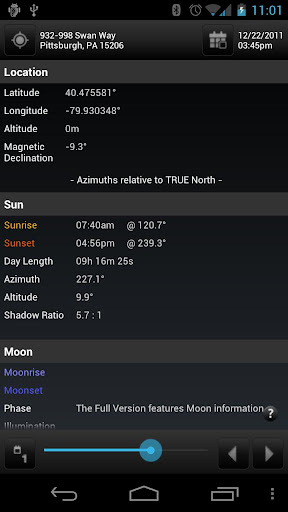
    SunSeeker for Android Sun Surveyor Lite

    Take a look at "Sun Surveyor Lite"
    by Adam Ratana


    Sun Surveyor Lite

    Sun Surveyor LiteSun Surveyor Lite


    I've just installed the Sun Surveyor Lite app, to help track the path of the sun, and it's great !!!!

    Very simple and intuitive to use, a must have as an equivalent app for the SunSeeker app available on the iPhone.

    Tuesday, 6 March 2012

    Lightroom 4, now available !!!


    Adobe download link

    Adobe Photoshop Lightroom 4 Create amazing images that inspire, inform, and delight. From first look to final image, Adobe® Photoshop® Lightroom® 4 software provides powerfully simple one-click tools and cutting-edge advanced controls for every step. Easily organize, perfect, and share all your photographs.

    It’s significantly cheaper than prior versions: the full program costs just $149, while the upgrade costs $79.

    Wednesday, 16 November 2011

    Sunday, 13 November 2011

    Can you tell what it is yet

    My Sunday afternoon fun.....
    Can you tell what it is yet?


    It's my DIY speedlite grid.

    Cheshire countryside, Runcorn, Daresbury

    Some shots I took whilst on an afternoons walk last week, late autumn, early winter, 2011.
    They were taken on my ordinary HTC DESIRE HD mobile phone, at 3megapixel resolution !

    Hope you like them.


    Thursday, 3 November 2011

    Moons of Jupiter, photos of Jupiter

    I took my first ever planetary pictures of Jupiter yesterday, 1st November, 2011, using my DSLR (Canon 500d), 18-200 f3.5-5.6 lens, RedSnapper tripod, and a piece of card.

    I set up the camera at 200mm, 2 second delay, f20 or so, and 3.2 second exposure, although the actual sensor exposure was less, and used Live View.

    The reason being was I placed the card in-front of the lens as I took the shot, and only moved it out of the way when there was about a second left of the exposure.
    The reason being was that I wanted any vibrations to die down before exposing the planet, so when I pressed the trigger, any vibrations should have died down after the initial trigger delay and the first few seconds that the sensor started to record information.

    I'd then gently move the card out of the way near the end of the exposure, there by taking a shot of Jupiter with reduced or subsided vibrations.
    I only knew about this technique after watching a BBC program on the night sky hosted by Brian Cox.

    All in all, I only spent 10 minutes trying for the shot, so fairly happy with the result, and the fact that you can see four moons of Jupiter.

    What do you think?


    Saturday, 29 October 2011

    Hoya Pro1 UV MC filter

    Ghostbuster !

    Say no to ghosting with a Hoya Pro1 UV MC ultra violet multi coated filter.


    Filter purchased from
    7DayShop.com

    Saturday, 27 August 2011

    A Higher Quality Setting in Photoshop Sometimes Reduces JPEG Quality

    As it turns out, via a link from PETAPIXEL, in PHOTOSHOP, saving a file a QUALITY 7, when compared to QUALITY 6, results in a poorer JPG quality image !!!!


    Wednesday, 22 June 2011

    Portrait Lighting - Light Metering

    I came across a YouTube video when searching for tutorials, or information on how to use a LIGHT METER to help with portrait studio lighting.

    The video below does just that !

    Thursday, 16 June 2011

    Portrait Lighting information

    I've recently signed up to a studio Portrait Lighting course, and the next few blogs will serve as my quick notes each week.

    Flickr Group discussing online Lighting Diagram Creator:
    http://www.flickr.com/photos/qhphotography/3546392515/

    Lighting Diagram Creator
    http://www.lightingdiagrams.com/Creator


    Portrait Lighting - Broad

    20110614 – Broad lighting


    During this session, we threw together the setup as shown above.

    This three light setup consists of:

    1. The first light is a key light.
      Usually this is the strongest light and this light sets the lighting of the scene.
      We used a medium softbox camera-right, set at half power.
    2. The second light is called a fill light.
      This light helps fill the shadows that the main light casts.
      This was behind the subject, camera-left.
    3. The last light is called a backlight (because it comes from the back), and is used to create a contour and separation.
      It is common to use a snoot or a gridspot on the backlight to avoid a spill.
      We actually just used a flash-head from high up, with some small directional cone...(unsure of name).

    An interesting webpage to read might be:
    http://www.diyphotography.net/3-point-lighting-technique

    A great video on YouTube is:
    http://www.youtube.com/watch?v=uH84-pA7p-c

    The video discusses:

    1. Rembrant – signified by triangular highlight on models cheek, light is 45 degrees off centre, infront of the model, camera left
    2. Butterfly – signified by the butterfly shaped shadow under the models nose, glamorous in appearance, the light is 90 degrees off centre high up pointing downwards
    3. Edge – this is very dramatic, light is the same height as the model, at 0 degrees to centre (same plane as the model)